TickCheck Changelog
All notable changes to TickCheck are documented here.
Version 1.1.0
Release focus
Version 1.1.0 is a major usability and UI update.
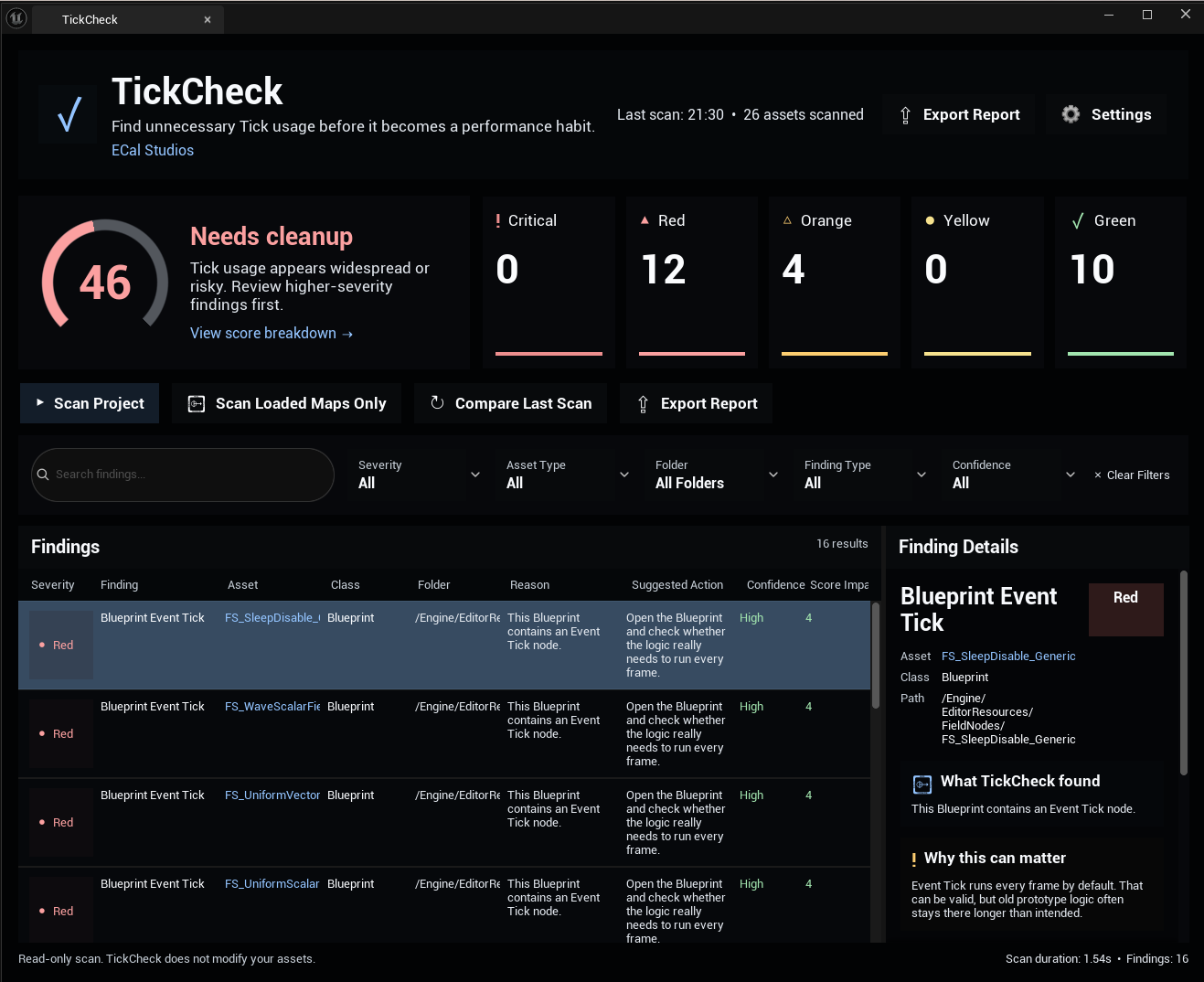
This update redesigns TickCheck into a more polished dashboard-style editor tool with clearer scan results, stronger visual hierarchy, better filtering, and built-in settings.
Added
- New premium dark dashboard UI
- New large Tick Health Score card
- New circular score ring visualization
- New severity summary cards
- New dashboard header with plugin identity and scan summary
- New action row with clearer scan and export controls
- New filter row for faster result navigation
- New right-side Finding Details panel
- New built-in Settings view inside the plugin window
- New scan duration display
- New findings count display
- New last scan display
- New severity filtering from dashboard cards
- New folder filter
- New confidence filter
- New asset type filter
- New finding type filter
- New cleaner row styling for scan findings
- New beginner-friendly details sections:
- What TickCheck found
- Why this can matter
- When it might be okay
- Safe next step
Changed
- Redesigned the main window layout
- Improved readability of scan results
- Improved visual spacing and hierarchy
- Improved score presentation
- Improved finding detail explanations
- Improved scan workflow clarity
- Improved settings access
- Improved button labels and action grouping
- Improved overall plugin presentation for Fab users
Fixed / Improved
- Double-click behavior now focuses on opening the selected asset
- Open Asset and Browse to Folder are clearer separate actions
- Settings no longer need to be accessed only through Project Settings
- Result filtering is easier for large projects
- The plugin feels more consistent with a professional editor tool workflow
Notes
TickCheck 1.1.0 remains a read-only tool.
It does not automatically modify assets, Blueprints, actors, components, or project settings.
This is intentional because Tick usage can be valid and project-specific.
Version 1.0.0
Initial release
- Project Tick scan
- Loaded map scan
- Tick Health Score
- Detection of Blueprint Event Tick usage
- Detection of actor Tick usage
- Detection of component Tick usage
- Detection of zero Tick Interval usage
- Detection of hidden actors still ticking
- Finding severity labels
- Finding confidence labels
- Suggested actions
- Markdown report export
- CSV report export
- Editor-only implementation
- No runtime impact
- No external dependencies
Planned for future versions
Possible future improvements include:
- Persistent scan history
- Better Compare Last Scan workflow
- Ignore list support
- Per-folder score breakdown
- More detailed score explanation
- Optional quick-fix helpers where safe
- Expanded Blueprint graph analysis
- Additional report templates
Copyright (c) 2026 ECal Studios. All Rights Reserved.