NamingCheck README
NamingCheck is an editor-only asset naming convention checker for Unreal Engine. It scans project assets for naming issues, explains what was found, suggests safer names when possible, and exports reports for cleanup or review.
Use it when you want to keep your Content Browser readable, prepare a project for handoff, or catch naming problems before they become part of a larger content pipeline.
Compatibility
| Item | Support |
|---|---|
| Plugin version | 1.0.0 |
| Unreal Engine | 5.5, 5.6, 5.7 |
| Supported platforms | Windows, macOS, Linux |
| Module type | Editor-only |
| Runtime impact | None |
| External services | None required |
Installation
- Download the NamingCheck build that matches your Unreal Engine version.
- Close Unreal Engine.
- Copy the
NamingCheckfolder into your project'sPluginsfolder.
YourProject/
  Plugins/
    NamingCheck/
      NamingCheck.uplugin
      Source/
      Resources/
      ...
- Reopen the project.
- If Unreal asks to rebuild or enable the plugin, follow the prompt for your project setup.
- Confirm NamingCheck is enabled in Edit → Plugins.
How to open NamingCheck
Open it from the Unreal Editor menu:
Tools → ECal Studios → NamingCheck
NamingCheck opens as a dockable editor tab, so you can keep it beside the Content Browser while reviewing assets.
Quick start
- Open NamingCheck.
- Pick a preset, such as Epic Style, Fab Seller, or Solo Project Simple.
- Set the scan scope to Whole Project or choose a folder.
- Click Scan Names.
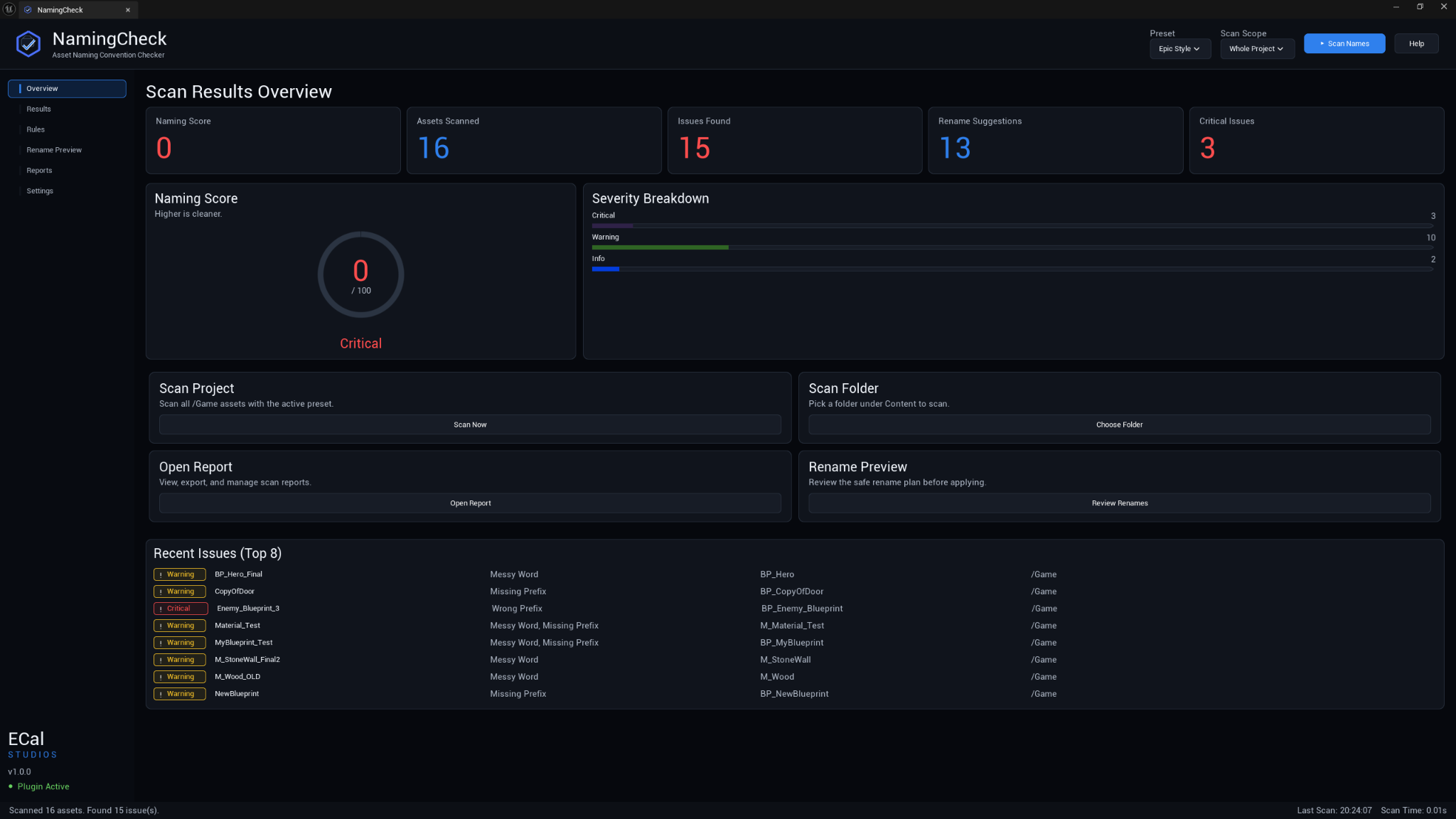
- Review the score and issue summary on Overview.
- Open Results to inspect findings.
- Use Rename Preview to review suggested changes before applying them.
- Export a Markdown or CSV report from Reports if you need a record.
Core features
-
Naming score
A 0-100 score with severity counts and a quick overview of project naming health.
-
Detailed results
Search, sort, filter, and inspect naming findings in one table.
-
Prefix rules
Check common Unreal prefixes such as
BP_,M_,T_,SM_, and custom project prefixes. -
Rename preview
Review suggested names and conflict checks before applying batch renames.
-
Custom profiles
Edit asset class rules, allowed characters, ignored paths, and naming behavior per project.
-
Reports
Export Markdown or CSV reports for documentation, cleanup notes, or team review.
What NamingCheck checks
| Area | Examples |
|---|---|
| Prefixes | Missing prefixes, wrong prefixes, or missing class rules |
| Characters | Invalid characters outside the allowed naming pattern |
| Messy words | Placeholder tokens like New, Test, Final, Copy, Temp, or WIP |
| Length | Names longer than the configured maximum length |
| Duplicate-like names | Similar names in the same folder that may be confusing |
Built-in presets
| Preset | Description |
|---|---|
| Epic Style | A practical Unreal-style prefix setup for common asset classes. |
| Fab Seller | A stricter profile intended for marketplace cleanup and review preparation. |
| Solo Project Simple | A lighter profile for personal projects and prototypes. |
Rename safety
NamingCheck's rename workflow is intentionally cautious:
- Suggestions are generated from the active rules.
- Existing meaningful name parts are preserved where possible.
- Unsafe or unclear rename rows can be skipped.
- Conflicts are shown before applying changes.
- Batch rename actions should be reviewed before confirmation.
Use source control
Before applying large rename batches, keep your project under source control or make a backup. Renaming assets is normal Unreal Editor work, but it can affect references, redirectors, and team workflows.
Reports
Reports can be exported as:
| Format | Best for |
|---|---|
| Markdown | Human-readable cleanup notes, documentation, pull requests, and wiki pages |
| CSV | Spreadsheets, issue tracking, filtering, or data review |
Reports are saved locally. NamingCheck does not upload project information.
Technical details
| Detail | Value |
|---|---|
| Module | NamingCheckEditor |
| Module type | Editor |
| C++ classes | 22 |
| Blueprint assets | 0 |
| Third-party dependencies | None |
| Runtime code | None |
Support
Email: [email protected]
Website: www.ecalstudios.com
When reporting an issue, include the NamingCheck version, Unreal Engine version, operating system, what you scanned, and relevant Output Log lines containing LogNamingCheck.
Copyright (c) 2026 ECal Studios. All Rights Reserved.