RefCheck README
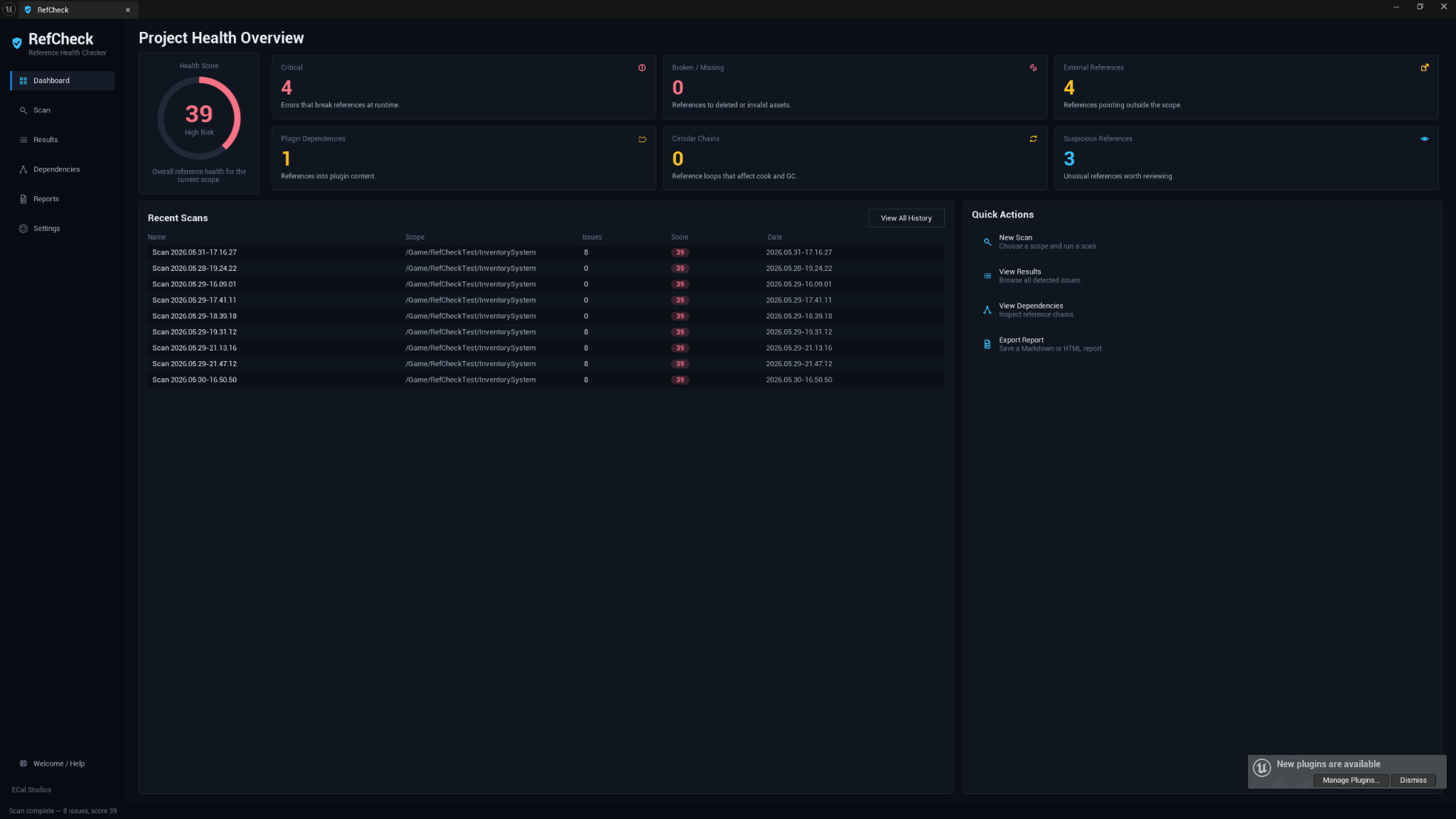
RefCheck is an editor-only reference health checker for Unreal Engine. It scans assets, folders, the open level, or the whole project for reference risks, explains what it found, and exports reports you can use during cleanup, packaging, migration, or Fab preparation.
Use it when you want to understand what your content depends on before you ship, share, migrate, or submit it.
Compatibility
| Item | Support |
|---|---|
| Plugin version | 1.0.0 |
| Unreal Engine | 5.5, 5.6, 5.7 |
| Supported platforms | Windows, macOS, Linux |
| Module type | Editor-only |
| Runtime impact | None |
| External services | None required |
| Fab listing | Open RefCheck on Fab |
Installation
- Download the RefCheck build that matches your Unreal Engine version.
- Close Unreal Engine.
- Copy the
RefCheckfolder into your project'sPluginsfolder.
YourProject/
  Plugins/
    RefCheck/
      RefCheck.uplugin
      Source/
      Resources/
      ...
- Reopen the project.
- If Unreal asks to rebuild or enable the plugin, follow the prompt for your project setup.
- Confirm RefCheck is enabled in Edit → Plugins.
How to open RefCheck
Open it from the Unreal Editor menu:
Tools → ECal Studios → RefCheck
You can also right-click selected assets or a folder in the Content Browser and choose:
ECal Studios → Scan References with RefCheck
RefCheck opens as a dockable editor tab, so you can keep it beside the Content Browser while reviewing findings.
Quick start
- Open RefCheck.
- Choose a scan target: Entire Project, Selected Folder, Selected Assets, or Open Level.
- Pick a preset, such as Default (Recommended), Fab Seller / Package Readiness, or Blueprint System.
- Click Start Scan.
- Review the health score and issue cards on the Dashboard.
- Open Results to inspect findings.
- Use the issue detail buttons to open assets, reveal assets, or open Unreal's Reference Viewer.
- Export a Markdown, HTML, or CSV report from Reports if you need a cleanup record.
Core features
-
Reference health score
A 0-100 score with severity counts and a quick overview of reference risk.
-
Flexible scan scopes
Scan the whole project, a folder, selected assets, or the open level.
-
Detailed issue results
Search, filter, select, and inspect reference findings in one table.
-
Dependency chains
Review readable dependency chains and jump into Unreal's Reference Viewer when you need a graph.
-
Built-in and custom presets
Use practical presets for everyday checks, Fab/package readiness, Blueprint systems, fast scans, or deep scans.
-
Reports
Export Markdown, HTML, or CSV reports for cleanup notes, handoff, or spreadsheet review.
What RefCheck checks
| Area | Examples |
|---|---|
| Missing references | Hard dependencies that cannot be resolved by the Asset Registry |
| Soft-missing references | Soft reference paths that point at content that no longer exists |
| External references | Assets that point outside the selected folder or intended content scope |
| Plugin dependencies | References into plugin content that may need disclosure or packaging review |
| Engine content dependencies | References into /Engine/... when engine content scanning is enabled |
| Circular dependencies | Bounded circular reference chains found through Asset Registry data |
| Suspicious references | Test, dev, temp, old, or similarly risky folders and names |
| Redirector-related risks | Redirector packages that may have been left after moving or renaming assets |
| Large dependency sets | Assets with unusually large dependency footprints |
Built-in presets
| Preset | Description |
|---|---|
| Default (Recommended) | Balanced reference review for normal project cleanup. |
| Fab Seller / Package Readiness | Stricter review for content that will be packaged, migrated, or submitted. |
| Blueprint System | Focused review for systems that should stay inside one folder. |
| Fast Scan | Faster first-pass scan with reduced depth and no cycle detection. |
| Deep Scan | More thorough scan with deeper walking and broader content inclusion. |
Reports
Reports can be exported as:
| Format | Best for |
|---|---|
| Markdown | Human-readable cleanup notes, documentation, pull requests, and wiki pages |
| HTML | Shareable offline reports that open in a browser |
| CSV | Spreadsheets, issue tracking, filtering, and data review |
Reports are saved locally. RefCheck does not upload project information.
Technical details
| Detail | Value |
|---|---|
| Module | RefCheckEditor |
| Module type | Editor |
| Runtime code | None |
| Third-party dependencies | None |
| Internet connection | Not required |
| Data storage | Local editor settings and user-exported reports only |
Support
Email: [email protected]
Website: www.ecalstudios.com
When reporting an issue, include the RefCheck version, Unreal Engine version, operating system, what you scanned, and relevant Output Log lines containing LogRefCheck.
Copyright (c) 2026 ECal Studios. All Rights Reserved.