RedirectCheck
RedirectCheck is an editor-only Unreal Engine plugin by ECal Studios that helps you find, review, and clean redirectors before packaging, submitting, migrating, or sharing your project.
Redirectors are normal during Unreal Engine development. They are created when assets are moved or renamed so old references can continue to work. The problem is that they are easy to forget, and over time they can make a project feel messy, harder to maintain, and less professional before release.
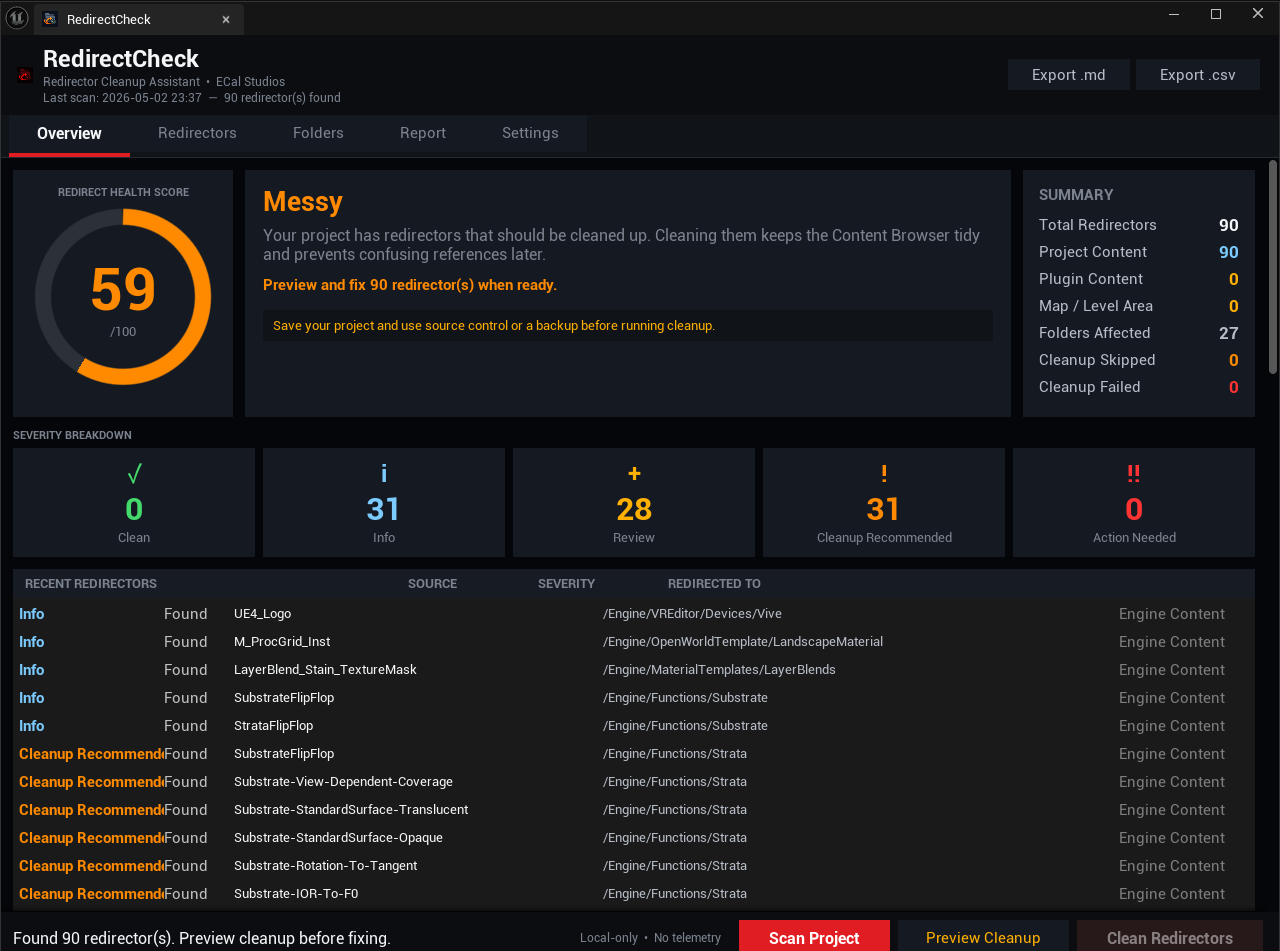
RedirectCheck gives you a clean dashboard, a health score, clear severity labels, cleanup preview, folder breakdowns, and exportable reports so you can handle redirectors with confidence.
Save before cleanup
RedirectCheck uses Unreal Engine's own redirector cleanup workflow, but cleanup still modifies package files on disk. Save your project and use source control or a backup before running cleanup.
What RedirectCheck helps with
-
Find redirectors
Scan your project with Unreal's Asset Registry and quickly see how many redirectors exist.
-
Redirect Health Score
Understand the state of your project with a simple
0–100health score. -
Clear priority levels
Review redirectors using severity labels like Info, Review, Cleanup Recommended, and Action Needed.
-
Preview before cleanup
Run a required preview step before cleanup is allowed, so you can confirm the scope first.
-
Folder impact view
See which folders are affected and where the project is messiest.
-
Markdown and CSV reports
Export local reports for QA, release preparation, cleanup records, or team review.
Best used before
- Packaging a build
- Sending a project to another developer
- Submitting content to Fab
- Cleaning up after asset migration
- Restructuring folders
- Preparing a project for release
Requirements
| Requirement | Details |
|---|---|
| Unreal Engine | 5.5, 5.6, 5.7 |
| Plugin type | Editor-only |
| Runtime impact | None |
| External dependencies | None |
| Primary tested platform | Windows |
| Other supported platforms | macOS and Linux editor builds |
Quick workflow
- Open Tools > ECal Studios > RedirectCheck.
- Click Scan Project.
- Review the health score, summary, severity cards, redirector list, and folder breakdown.
- Click Preview Cleanup to confirm what will be processed.
- Click Clean Redirectors when you are ready.
- Check the Report tab for before and after results.
- Export a Markdown or CSV report if needed.
Fab listing
RedirectCheck is available on Fab: Open RedirectCheck on Fab.
Documentation
Support
For support, email [email protected] and include the plugin name, plugin version, Unreal Engine version, and relevant Output Log lines containing LogRedirectCheck.